Pulse UI
The design system powering Sber's Pulse HR platform across 65+ services: moving from fragmented custom screens to semantic token theming, a product-team contribution model, and a Design Gate quality process. Over 1.5 years: 81% CSI, 60% Adoption, custom component usage reduced to 15%, and 50+ teams migrated to new color tokens in 4 months.
Product & context
Pulse UI (originally Impulse DS) is the design system powering Sber’s Pulse HR platform across more than 65 services. It spans everything from lightweight landing pages to high-density enterprise workspaces: data tables, analytics dashboards, and team calendars.
A core architectural capability of Pulse UI is multi-brand theming. Through semantic design tokens and structured palette relationships, teams can adjust color themes, typography, corner radii, and surface parameters without rebuilding product screens.
- Role
- Design System Lead (Sber)
- Contribution
- Audit & research · Strategy & planning · Design & engineering · Product adoption · Operations & growth
- Core team
- Product Owner · Product Designer (×2) · Frontend Engineer (×2)
- Scale
- 65+ services on the Pulse platform · 50+ product teams
- Timeline
- 2021 — 2025 (key metrics checkpoint: Q1 / 2024, 1.5-year results)
What needed fixing
When we began restructuring the system, six recurring bottlenecks were slowing down both the core DS team and product squads across the platform:
- High share of custom componentsProduct teams were building local one-off buttons, modals, and tables instead of reusing shared library primitives.
- No repeatable delivery pipelineComponent creation and updates lacked explicit stages for discovery, scoping, testing, review, and team demos.
- No long-term roadmapThe library operated reactively off ad-hoc tickets rather than a strategy aligned with platform and business goals.
- Low buy-in from product teamsDesigners and engineers often viewed the design system as an external constraint rather than a shared accelerator.
- Missing components and unclear boundariesTeams lacked key patterns and had no clear criteria for what belonged in the shared core versus local product folders.
- Design–code driftFigma libraries and Storybook were out of sync; designers regularly used components in mockups before they existed in code.
How we solved it
1. Library audit & custom replacement strategy
We audited the existing component library to identify unused, duplicate, or overlapping components, then built a phased replacement plan with product squads to retire custom controls and raise system Adoption.
2. End-to-end component delivery process
We rebuilt the component lifecycle around explicit stages: research, estimation, testing, design/code review, and live functional demos for product teams, paired with automated build and release pipelines to reduce manual errors.
3. Long-term strategy & open backlog
We benchmarked mature enterprise design systems against the needs of current and upcoming Pulse services, establishing a long-term roadmap and an open backlog visible to every product squad.
4. Core vs. local triage & Figma–Storybook sync
We cataloged missing components across teams and separated shared core primitives from local product-specific modules. A full gap analysis between Figma and Storybook mapped every discrepancy, synchronized library and code releases so designers could no longer ship unbuilt components in mockups, and introduced regular DS Check up audits.
5. Education, workshops & community
We launched hands-on training sessions, onboarding guides, and regular platform-wide meetups where teams reviewed the open backlog, upcoming releases, and component assembly practices.
Semantic tokens, foundations & component specs
When the business needed runtime theme switching across the platform, we redesigned our color architecture from the ground up. We separated the base palette (10 color ramps graded 10–100 plus utility gradients) from functional semantic tokens (bg-primary, text-secondary, interactive states, and illustration tokens) across both Light and Dark modes.
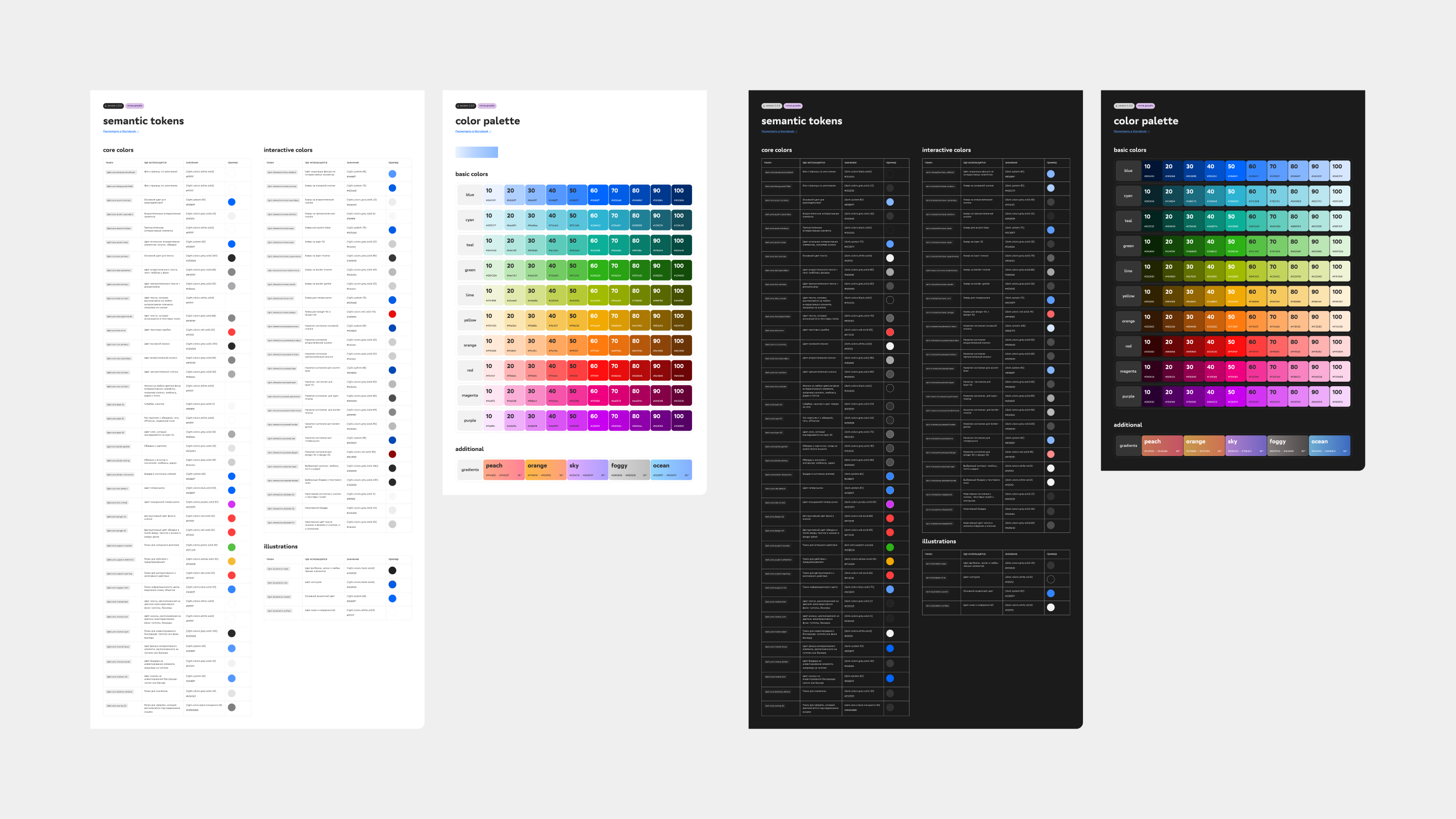
We wrote a step-by-step migration playbook for both Figma and code. Migrating legacy screens was hardest for large product squads — through hands-on support and clear tooling, we migrated more than 50 product teams to the new color tokens in 4 months.
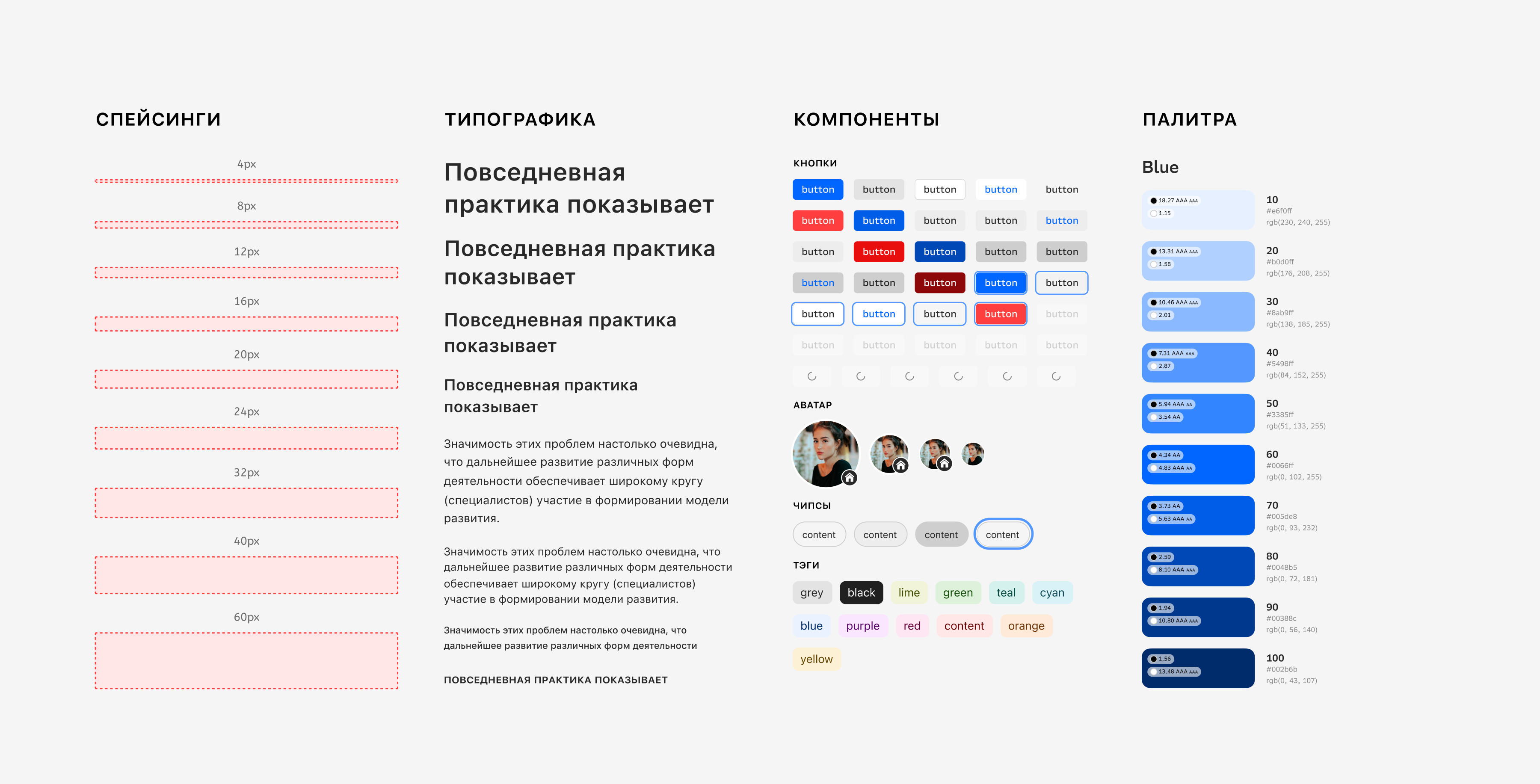
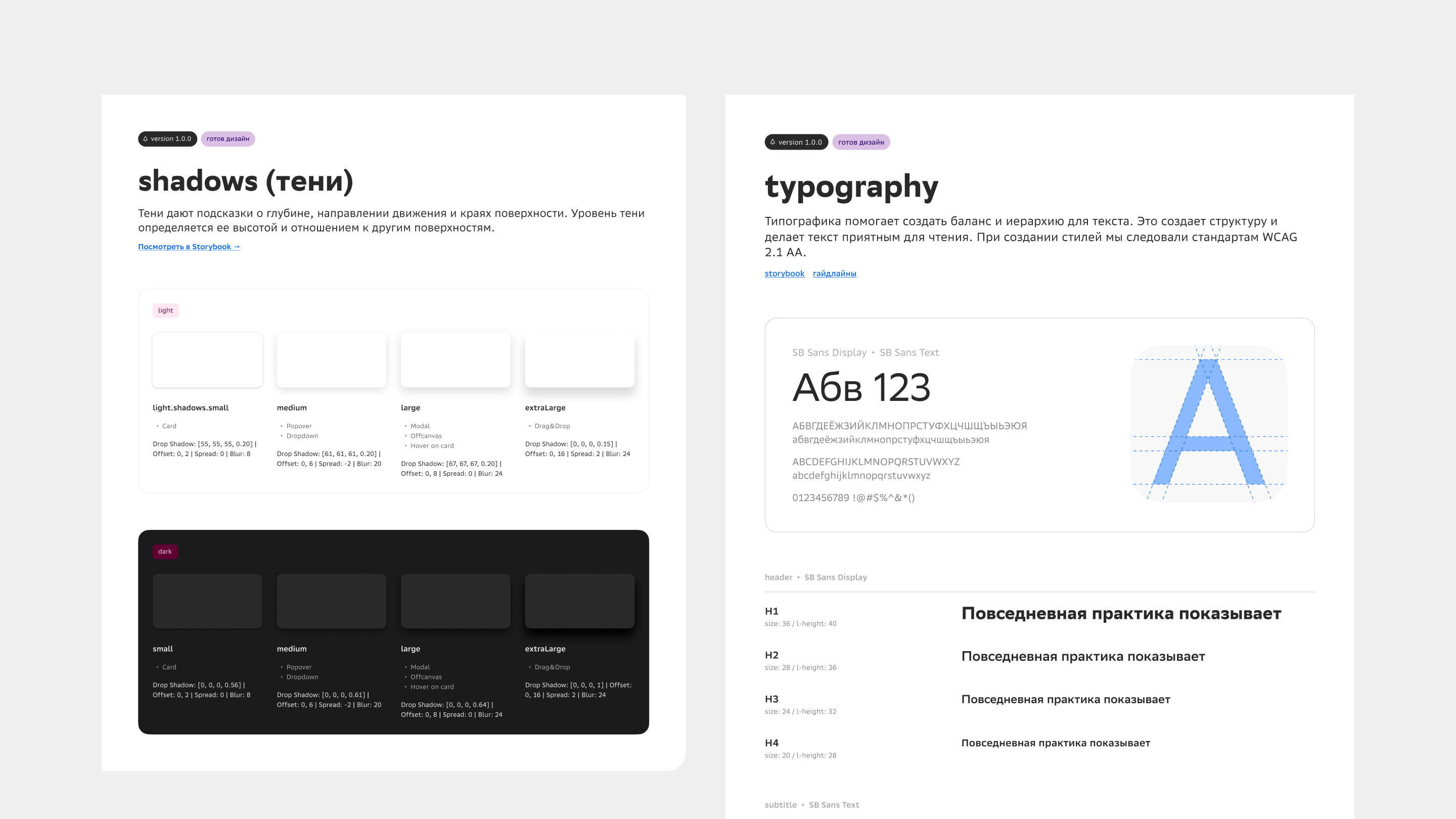
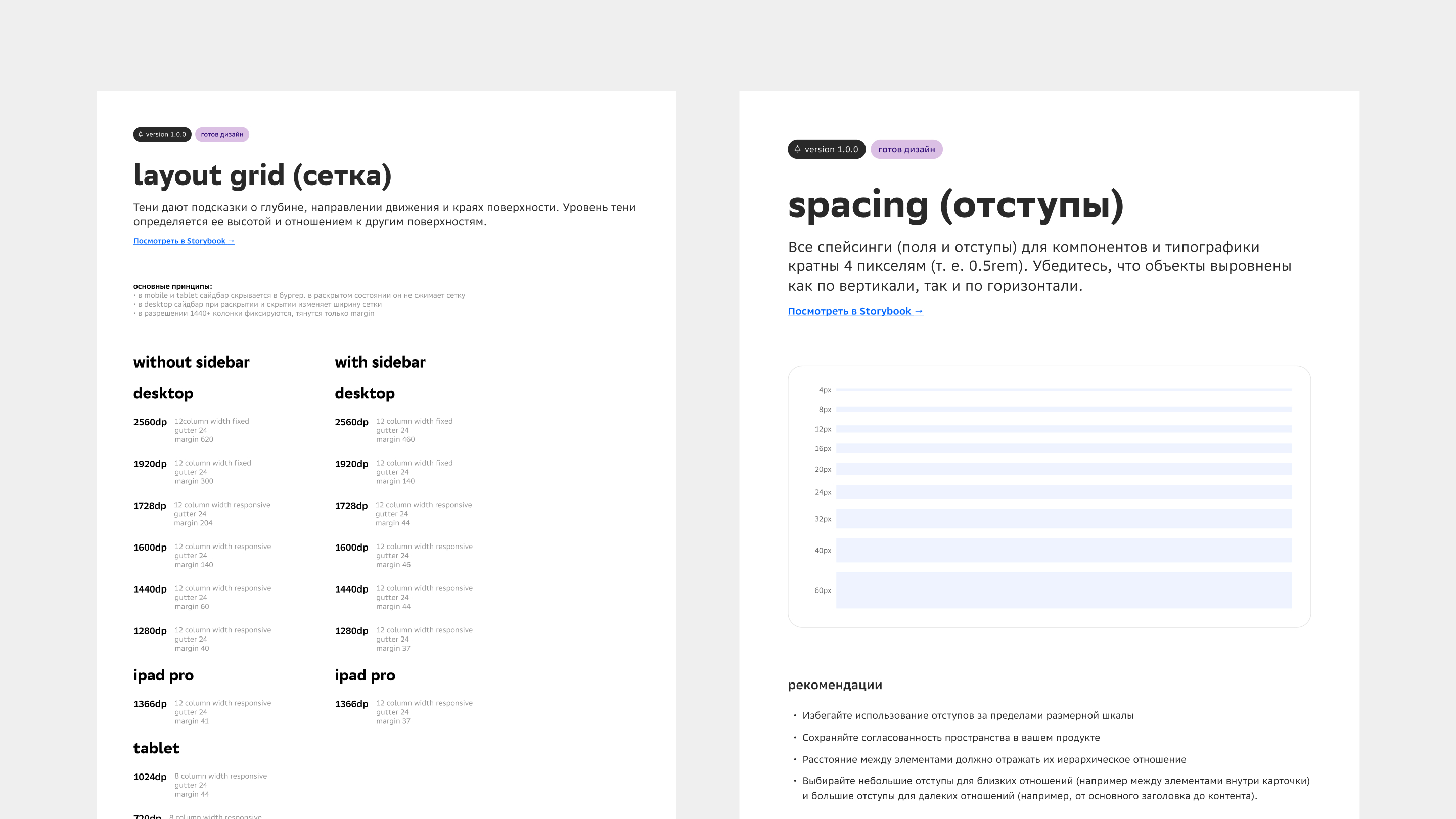
In parallel, we formalized the v1.0.0 foundations with direct links to Storybook and usage guidelines:
- Shadows (elevation): four elevation tiers (
smallfor cards,mediumfor popovers and dropdowns,largefor modals and offcanvas panels,extraLargefor drag & drop) tuned separately for Light and Dark modes; - Typography: heading scale on
SB Sans Displayand body copy onSB Sans Text, engineered for WCAG 2.1 AA contrast compliance; - Layout grid & spacing: 12-column responsive and fixed grid rules across breakpoints from
1024dp(Tablet) to2560dp(with and without sidebar), plus a strict4px (0.5rem)spatial scale.
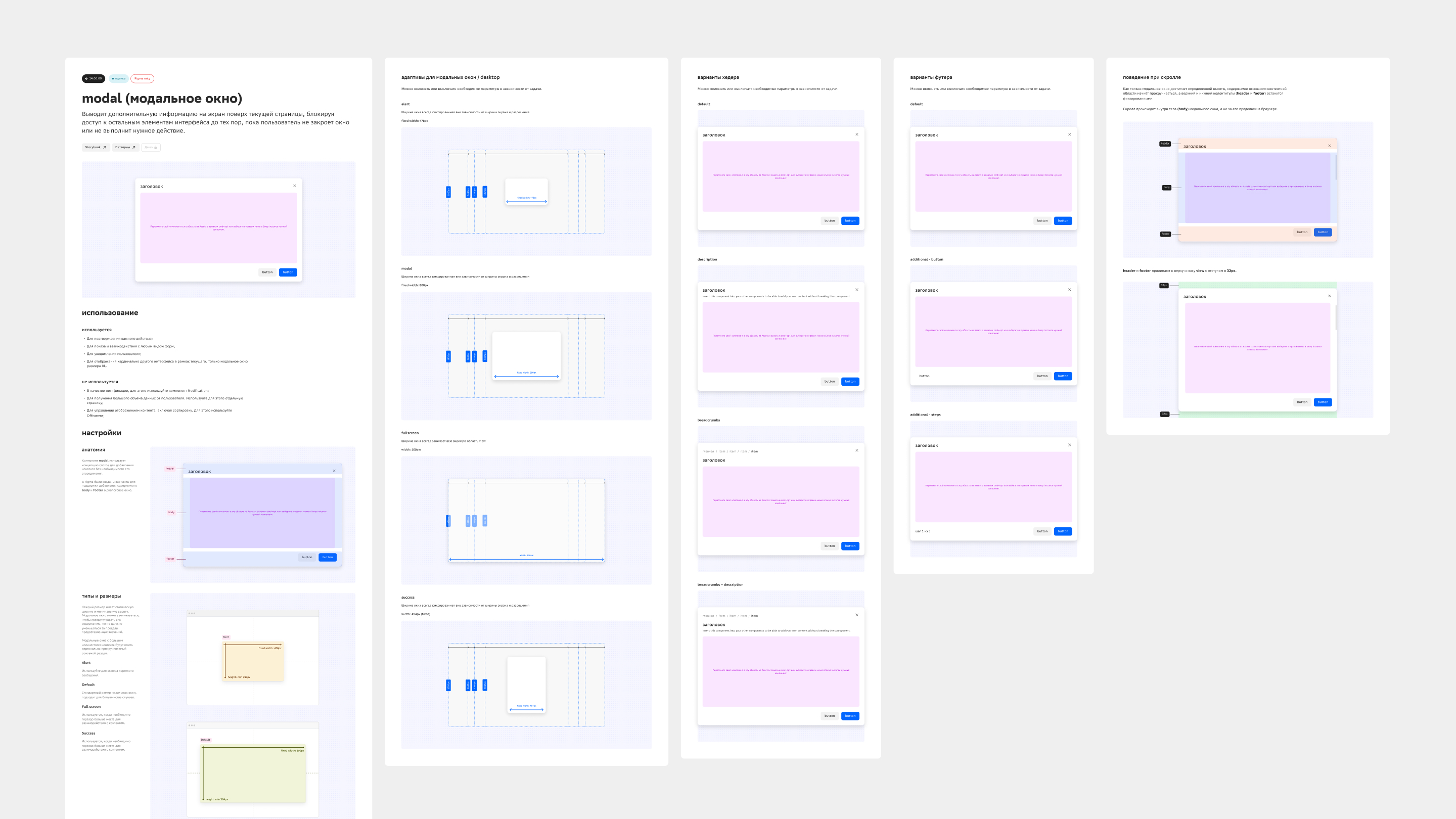
Every complex component was documented down to its edge cases so designers and engineers shared one specification — covering anatomy, do/don’t usage rules, desktop breakpoint behavior, header/footer variants, and internal scroll pinning.
Key organizational shifts
- Product-team contribution modelWith a compact core team (2 designers and 2 frontend engineers) supporting 65+ services, we designed and launched a federated contribution workflow: product squads could fix bugs, propose improvements, and ship new components into the shared library.
- Design Gate quality control processWe introduced a structured Design Gate review before mockups entered engineering and before coded screens shipped to production. Because of its executive visibility and scale, Design Gate eventually spun out of the design system into its own dedicated quality team.
- Lifecycle & migration documentationWe wrote practical playbooks covering the full component lifecycle, building local composite components, and migrating screens to semantic tokens.
- Cultural shift around the design systemOpen roadmaps, regular demos, and federated contribution turned product squads from passive consumers into active co-owners of the system.
Impact & metrics (Q1 / 2024 — 1.5-year results)
We tracked system health through three core metrics: team satisfaction (CSI — Component Satisfaction Index), platform-wide component coverage (Adoption), and the share of custom one-off controls remaining in products (Custom Usage).
CSI (satisfaction)81%
Adoption60%
Custom Usage15%
| Metric / outcome | Result | How it was achieved |
|---|---|---|
| CSI (Component Satisfaction Index) | 81% | Regular platform meetups, structured feedback loops with product designers and engineers, and a predictable release pipeline. |
| Adoption | 60% | Hands-on training sessions, clear Notion & Storybook documentation, and active migration support from the core DS team. |
| Custom Usage | 15% | Library gap closure, federated contribution from product squads, Design Gate reviews, and faster turnaround on component requests. |
| Semantic token migration | 50+ teams in 4 mos. | Full semantic token architecture for Light/Dark theming, a step-by-step migration guide, and hands-on support across squads. |